Get More Out of Your Internet Connection with Simple Tweaks

Get More Out of Your Internet Connection with Simple Tweaks
A fast and reliable internet connection has become essential for everyday life—whether you’re working from home, streaming your favorite shows, or gaming online. But even with a good broadband plan, your connection can sometimes feel slow or unstable. The good news is that a few simple adjustments can often make a big difference—without the need to buy new equipment. Here’s how to get more out of your internet connection.
Start by Testing Your Speed
Before making any changes, it’s smart to see how your connection is actually performing. Run a speed test—using your provider’s website or a trusted service like Speedtest.net—and compare the results with the speed you’re paying for.
Try testing at different times of day. If your speed fluctuates a lot, it could be due to network congestion or equipment that isn’t performing optimally.
Place Your Router Strategically
Router placement has a major impact on how well your Wi-Fi signal reaches every corner of your home. Many people tuck their router away in a corner, behind furniture, or near the floor—but that can weaken the signal.
- Place your router centrally in your home, ideally high up and in the open.
- Avoid obstacles like concrete or brick walls that can block the signal.
- Keep it away from electronics such as microwaves, cordless phones, and baby monitors that can cause interference.
Simply moving your router to a better spot can noticeably improve coverage.
Læs også:

Keep Your Equipment Updated
Just like computers and smartphones, routers and modems need updates. Check if there’s new firmware available for your router—it can improve both performance and security. Many modern routers can update automatically through the manufacturer’s app or web interface.
If your router is more than five years old, it might be time for an upgrade. Newer models support faster standards like Wi-Fi 6 or Wi-Fi 6E, which offer better coverage and higher speeds—especially when multiple devices are connected.
Use a Wired Connection When It Matters
While Wi-Fi is convenient, a wired connection is still the most stable option. If you work from home, play online games, or stream in 4K, it’s worth connecting your computer or TV directly with an Ethernet cable.
A wired connection eliminates wireless interference and ensures you’re getting the full speed your plan provides.
Optimize Your Wi-Fi Network
If you live in an apartment building or a densely populated area, your Wi-Fi channels might be crowded. Most routers automatically select a channel, but it’s not always the best one. You can manually choose a less congested channel in your router’s settings—especially on the 2.4 GHz band.
Also, consider switching to the 5 GHz band if your devices support it. It offers faster speeds and less interference, though the range is slightly shorter.
Manage Network Traffic
When multiple devices are online at once, your connection can slow down. Streaming, video calls, and gaming all use a lot of bandwidth, and if several people are doing these activities simultaneously, performance can suffer.
You can:
- Turn off devices you’re not using.
- Schedule large downloads for off-peak hours.
- Enable “Quality of Service” (QoS) in your router settings to prioritize important activities like video meetings.
Small changes in how you use your network can make a big difference in perceived speed.
Consider a Mesh Network
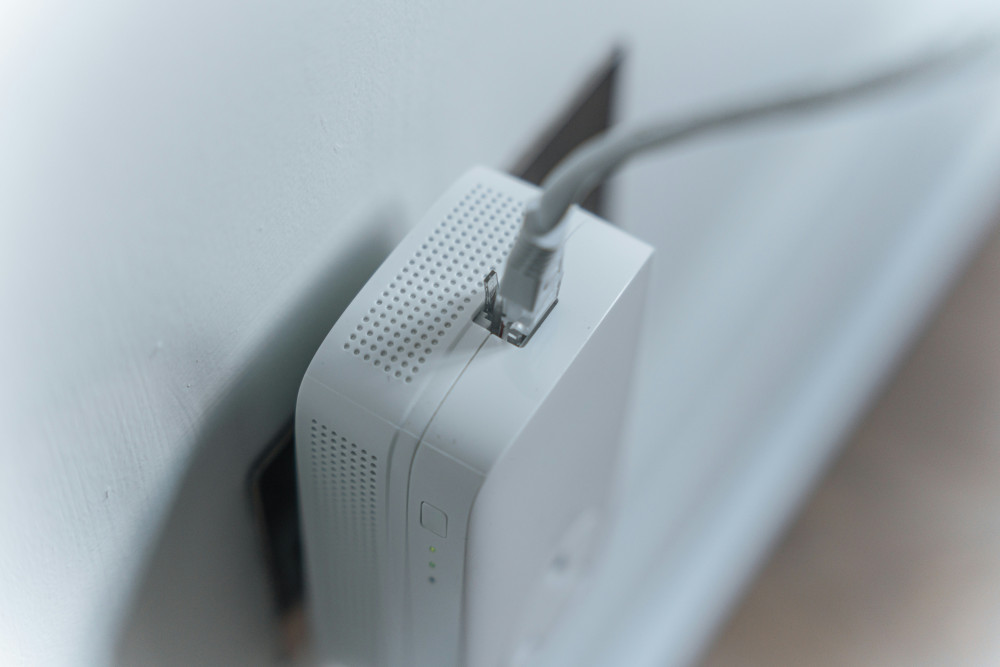
If you live in a larger home or have dead zones where Wi-Fi doesn’t reach, a mesh network might be the solution. It uses multiple small units that work together to spread a strong, consistent signal throughout your home. Mesh systems are easy to set up and can provide reliable coverage in every room—even on the porch or in the basement.
Check Your Provider and Plan
If you’ve tried everything and still experience issues, the problem might be with your internet service provider. Contact customer support and ask them to test your connection. Sometimes a technician can identify issues with cables or connections that affect performance.
It’s also worth reviewing your plan. Internet speeds and prices change frequently, and you might be able to upgrade to a faster plan for the same cost—or even less.
A Better Connection with Small Steps
Getting more out of your internet connection doesn’t usually require major investments. Often, small adjustments—like moving your router, updating your equipment, or tweaking your settings—can deliver the biggest improvements. With a bit of patience and some simple troubleshooting, you can enjoy a faster, more stable, and more satisfying online experience every day.
Læs også: